 trizen
3.9 KiB
pipe-viewer
A lightweight application (fork of straw-viewer) for searching and playing videos from YouTube, using the API of invidio.us.
The goal of this fork is to parse the YouTube website directly and rely on the invidious instances only as a fallback method.
pipe-viewer
- command-line interface to YouTube.

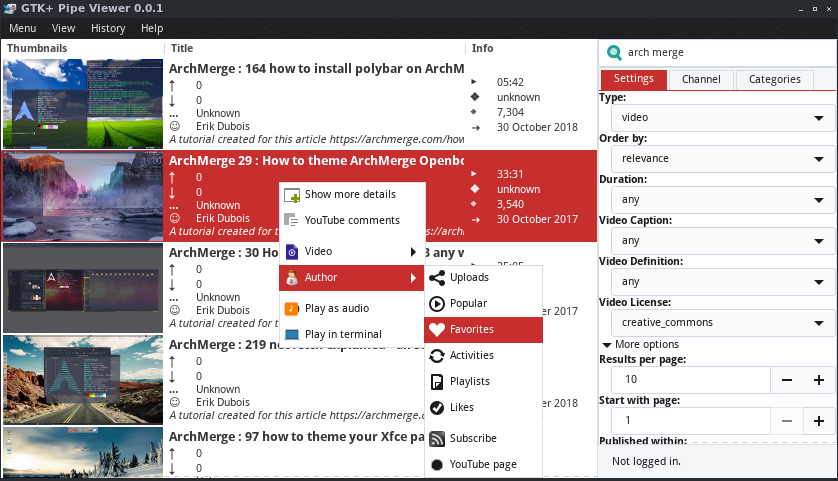
gtk-pipe-viewer
- GTK+ interface to YouTube.
STATUS
The project is in its early stages of development and some features are not implemented yet.
AVAILABILITY
- Arch Linux (AUR): https://aur.archlinux.org/packages/pipe-viewer-git/
INSTALLATION
To install pipe-viewer, run:
    perl Build.PL
    sudo ./Build installdeps
    sudo ./Build install
To install gtk-pipe-viewer along with pipe-viewer, run:
    perl Build.PL --gtk
    sudo ./Build installdeps
    sudo ./Build install
TRY
For trying the latest commit of pipe-viewer, without installing it, execute the following commands:
    cd /tmp
    wget https://github.com/trizen/pipe-viewer/archive/main.zip -O pipe-viewer-main.zip
    unzip -n pipe-viewer-main.zip
    cd pipe-viewer-main/bin
    perl -pi -ne 's{DEVEL = 0}{DEVEL = 1}' {gtk-,}pipe-viewer
    ./pipe-viewer
DEPENDENCIES
For pipe-viewer:
For gtk-pipe-viewer:
- Gtk3
- File::ShareDir
- + the dependencies required by pipe-viewer.
Build dependencies:
Optional dependencies:
- Local cache support: LWP::UserAgent::Cached
- Better STDIN support (+ history): Term::ReadLine::Gnu
- Faster JSON deserialization: JSON::XS
- Fixed-width formatting (--fixed-width, -W): Unicode::LineBreak or Text::CharWidth
PACKAGING
To package this application, run the following commands:
    perl Build.PL --destdir "/my/package/path" --installdirs vendor [--gtk]
    ./Build test
    ./Build install --install_path script=/usr/bin
INVIDIOUS INSTANCES
Sometimes, the default instance, invidious.snopyta.org, may fail to work properly. When this happens, we can change the API host to some other instance of invidious, such as invidious.tube:
pipe-viewer --api=invidious.tube
To make the change permanent, set in the configuration file:
api_host => "invidious.tube",
Alternatively, the following will automatically pick a random invidious instance everytime the program is started:
api_host => "auto",
The available instances are listed at: https://instances.invidio.us/
SUPPORT AND DOCUMENTATION
After installing, you can find documentation with the following commands:
man pipe-viewer
perldoc WWW::PipeViewer
LICENSE AND COPYRIGHT
Copyright (C) 2012-2020 Trizen
This program is free software; you can redistribute it and/or modify it under the terms of either: the GNU General Public License as published by the Free Software Foundation; or the Artistic License.
See http://dev.perl.org/licenses/ for more information.