 mendhak
56 linhas
1.8 KiB
Markdown
56 linhas
1.8 KiB
Markdown
Rhythmbox tray icon plugin
|
|
==========================
|
|
|
|
A tray icon to control basic Rhythmbox features. Requires Rhythmbox 2.9+. Was working in Ubuntu 12.04, but is no longer maintained due to Ubuntu Panel restrictions.
|
|
|
|
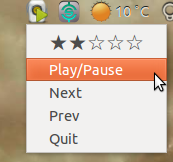
You can rate the track, play/pause, go previous, go next, or quit.
|
|
|
|
|
|
|
|
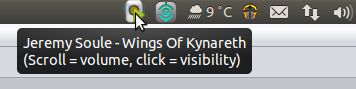
Scroll up and down over the tray icon to adjust Rhythmbox's volume.
|
|
|
|
Click on the tray icon to show or hide the Rhythmbox window.
|
|
|
|
The tray icon has a green 'play' overlay when a track is playing.
|
|
|
|
When you hover over the icon, it shows the playing track:
|
|
|
|
|
|
|
|
|
|
How to install
|
|
-----------------
|
|
|
|
To install, run these commands in a terminal window:
|
|
|
|
wget https://github.com/mendhak/rhythmbox-tray-icon/raw/master/rhythmbox-tray-icon.zip
|
|
unzip -u rhythmbox-tray-icon.zip -d ~/.local/share/rhythmbox/plugins
|
|
|
|
To do it manually, download [rhythmbox-tray-icon.zip](https://github.com/mendhak/rhythmbox-tray-icon/raw/master/rhythmbox-tray-icon.zip) and extract its contents into ~/.local/share/rhythmbox/plugins.
|
|
|
|
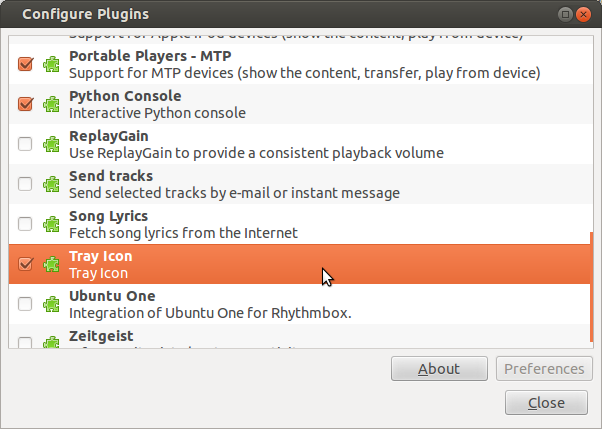
Start Rhythmbox. Go to Edit > Plugins.
|
|
|
|
Find 'Tray Icon' in the plugins list and enable it. A Rhythmbox icon appears in the notification area.
|
|
|
|
|
|
|
|
|
|
How to uninstall
|
|
-----------------
|
|
|
|
To uninstall, run this command in a terminal window:
|
|
|
|
rm ~/.local/share/rhythmbox/plugins/tray_*.*
|
|
|
|
It will remove the tray_* files from the plugins folder.
|
|
|
|
Notes
|
|
----------------
|
|
|
|
On Ubuntu, you will need to allow applications in your systray
|
|
|
|
gsettings set com.canonical.Unity.Panel systray-whitelist "['all']"
|
|
|
|
Heavily modified from [palfrey's original](https://github.com/palfrey/rhythmbox-tray-icon) plugin.
|
|
|